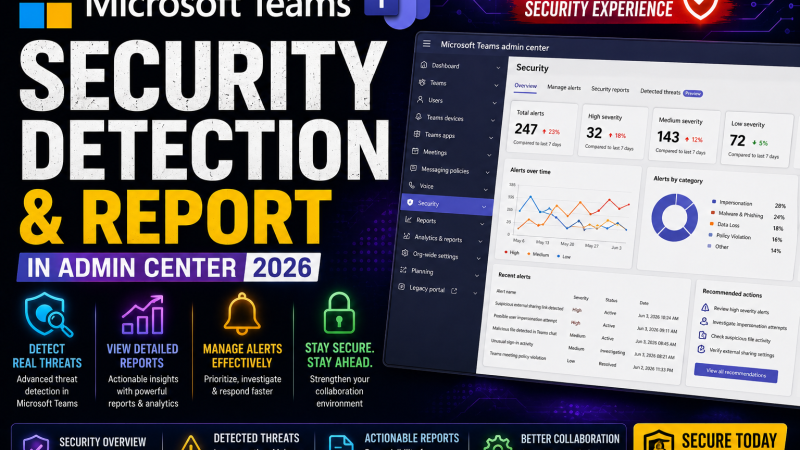
[Breaking — August 2026] Microsoft has officially launched the Security Detection Report in the Teams Admin Center, marking one of the most significant native security upgrades to Microsoft Teams since its enterprise-scale adoption. Tracked under Microsoft 365 Roadmap ID 560702 and Message Center notification MC1311977, the feature is rolling out to worldwide standard multi-tenant customers from late August 2026, with global completion expected in early September 2026.
For the first time, IT administrators and Security Operations Centre (SOC) analysts have a purpose-built, centralized dashboard inside the Teams Admin Center that consolidates three critical messaging threat categories — impersonation, malicious URLs, and weaponizable file types — into a single, actionable reporting interface. Until now, detecting these threats required pivoting across the Microsoft Defender portal, Defender for Office 365 incident queues, and disconnected admin reports — a fragmented workflow that cost responders valuable investigation time.
In this deep-dive research post, we cover the full technical picture: what the Microsoft Teams Security Detection Report detects, how to access and configure it, how to read the detection table, how to export data for SIEM ingestion, how to use the complementary KQL hunting queries in Microsoft Defender Advanced Hunting, and how this report fits into Microsoft’s broader 2026 Teams security architecture — including the new deepfake “Report a Meeting” feature and Microsoft Defender URL click alerts for Teams.
Why Microsoft Teams Is Now a Tier-1 Cyberattack Surface
The launch of the Security Detection Report is not coincidental timing — it is a direct response to a threat landscape that has deteriorated significantly in the past twelve months. Microsoft Teams, originally designed as a productivity and collaboration platform, has become one of the highest-value attack surfaces in the enterprise technology stack. The statistics are alarming:
- 41% increase in Microsoft Teams-based phishing and social engineering attacks between October 2025 and March 2026 (Microsoft Security Intelligence)
- Teams voice phishing (vishing) attacks rose to nearly 10 times their mid-2025 baseline by late June 2026
- 77% of Teams-based social engineering incidents specifically targeted executives, managers, or directors — not general employees
- The median time from first malicious Teams message to successful payload execution has compressed to just 12 minutes
- Nearly 17.38% of all Teams-based attacks are now multi-channel, combining Teams with email to increase attack success rates
- Microsoft detected 7.6 billion email phishing threats in a recent reporting period, with Teams increasingly used as the secondary channel to reinforce email lures
The core exploit vector enabling these attacks is a well-known Teams configuration: by default, Microsoft Teams permits external users — anyone with a Microsoft account — to initiate chat messages with employees inside an organisation. Threat actors, including nation-state APT groups such as Volt Typhoon and Salt Typhoon, routinely exploit this access to deliver phishing lures, impersonate IT helpdesk staff, and stage malware delivery through weaponised file attachments — all via a platform that employees instinctively trust.
According to Microsoft’s Q2 2026 Email and Messaging Threat Landscape report, Teams-based attacks now frequently originate from compromised Microsoft 365 tenants or freshly registered tenant accounts specifically created for social engineering campaigns — making traditional sender-reputation signals unreliable for detection.
This is the threat environment that the Security Detection Report is designed to address.
What Is the Microsoft Teams Security Detection Report?
The Microsoft Teams Security Detection Report is a native reporting interface inside the Teams Admin Center that provides a unified view of messaging security detections across three threat signal categories. It is Microsoft’s first purpose-built, centralized threat visibility tool embedded directly inside the Teams admin console — no Defender portal pivot required for initial triage.
Access path:
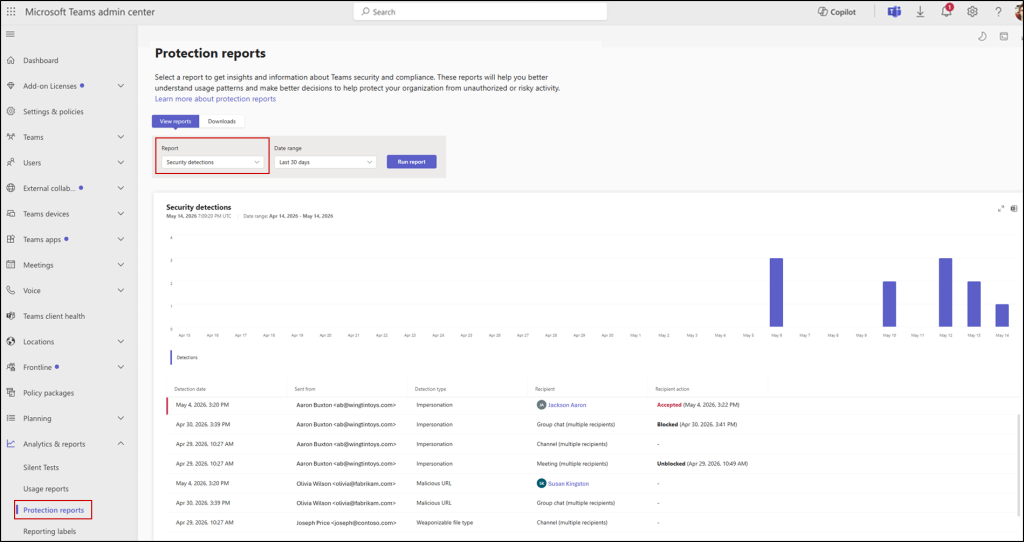
Teams Admin Center → Analytics & Reports → Protection Reports → Security Detections Report
The report presents two primary interface elements:
- A detection volume chart showing the number of threat detections over the selected date range, broken down by detection type
- A detailed detection table listing individual threat events with full context including sender identity, detection classification, recipient, and conversation thread identifier
What the report is NOT:
- It does not replace the Microsoft Defender portal or Defender for Office 365 incident queue
- It does not generate real-time push alerts — administrators must actively navigate to the report or work from exported CSV data
- It does not cover internal sender threats — it is scoped to external messaging threats
- It is cloud-only — not available for on-premises Teams Server environments
The Three Detection Pillars: What the Security Detection Report Tracks
The Microsoft Teams Security Detection Report consolidates three discrete threat signal categories, each targeting a distinct attack technique used against Teams users in 2026.
Pillar 1: Impersonation Detection
Impersonation detection identifies messages where an external sender is attempting to masquerade as a trusted internal entity — commonly an IT helpdesk staff member, a senior executive, or Microsoft support. This is the most common social engineering technique used in Teams-based attacks in 2026.
Key characteristic: Impersonation detection is enabled by default and requires no additional configuration. Microsoft’s machine learning model analyses sender display names, message context, urgency signals, and domain patterns to flag messages where the sender identity does not correspond to a verified internal domain but presents as a known trusted entity.
Common impersonation patterns flagged by this detection include:
- External accounts with display names that closely match internal employees or IT department naming conventions
- Messages claiming to originate from “Microsoft Support”, “IT Help Desk”, or “Security Operations”
- Urgency-driven lures using account suspension, password expiration, or active breach language
- Attackers using generic display names combined with infrastructure-related email addresses to appear credible
Microsoft Security Intelligence data from Q1 2026 shows that 91% of Teams impersonation attacks used display names mimicking internal IT department naming conventions — a technique specifically designed to bypass the instinctive trust employees place in messages from apparent internal sources.
Pillar 2: Malicious URL Detection
Malicious URL detection flags links shared in Teams messages, chats, and channels that point to known phishing pages, credential harvesting portals, command-and-control infrastructure, or other malicious destinations. Unlike impersonation detection, malicious URL scanning requires explicit configuration in Messaging Safety settings.
To enable malicious link scanning:
- Navigate to Teams Admin Center → Messaging Policies
- Select or create the relevant policy
- Under Messaging Safety, enable URL scanning for external messages
- Optionally extend scanning to all messages, including internal senders, for maximum coverage
The underlying threat intelligence powering malicious URL detection comes from Microsoft Safe Links, part of Microsoft Defender for Office 365. When a Teams user clicks a link that matches a known malicious indicator, Safe Links intercepts access and generates a detection event that surfaces in the Security Detection Report.
This capability is closely related to — but distinct from — the Microsoft Defender URL Click Alerts for Teams (now in general availability since March 2026), which generates specific Defender portal alerts and requires Microsoft Defender for Office 365 Plan 2 or Microsoft 365 E5 licensing. We cover the Defender URL alert layer in detail in a later section.
Pillar 3: Weaponizable File Type Detection
Weaponizable file type detection flags files shared through Teams that belong to categories historically exploited for malware delivery, exploit execution, or credential theft. Like malicious URL scanning, this detection category also requires Messaging Safety settings to be enabled for unsafe file scanning.
File categories flagged by weaponizable file detection include:
- Executables: .exe, .dll, .bat, .cmd, .ps1, .vbs, .js, .hta
- Shortcut files: .lnk — increasingly used for LNK-based payload delivery chains
- Office macros: .xlsm, .docm, .pptm — documents with embedded active macros
- Archives with embedded executables: .zip, .rar, .7z files containing weaponised content
- Installer packages: .msi, .msp files used to deliver malware under the guise of software updates
The rise of weaponizable file delivery through Teams coincides directly with Microsoft’s tightening of macro-execution policies in Office 365 — attackers have migrated to LNK files, .hta droppers, and ISO-wrapped executables specifically to circumvent macro blocking. The CVE-2025-21298 zero-click RCE vulnerability in Windows OLE, which we covered in our analysis of file-based zero-click exploitation via Outlook, illustrates how file delivery vectors continue to evolve.
How to Access the Security Detection Report: Complete Admin Walkthrough
The Security Detection Report is accessible to users with the Teams Administrator or Teams Communication Support Engineer Azure AD role.
- Open a browser and navigate to the Teams Admin Center: https://admin.teams.microsoft.com/
- Sign in with your Microsoft 365 admin credentials
- In the left-hand navigation panel, click Analytics & Reports
- Expand the submenu and select Protection Reports
- In the Report dropdown, select Security detections report
- Set your desired date range using the date picker (historical lookback depends on your Microsoft 365 compliance retention settings)
- The chart and detection table will populate with all flagged events in the selected timeframe
Understanding the Detection Table: Reading Each Field
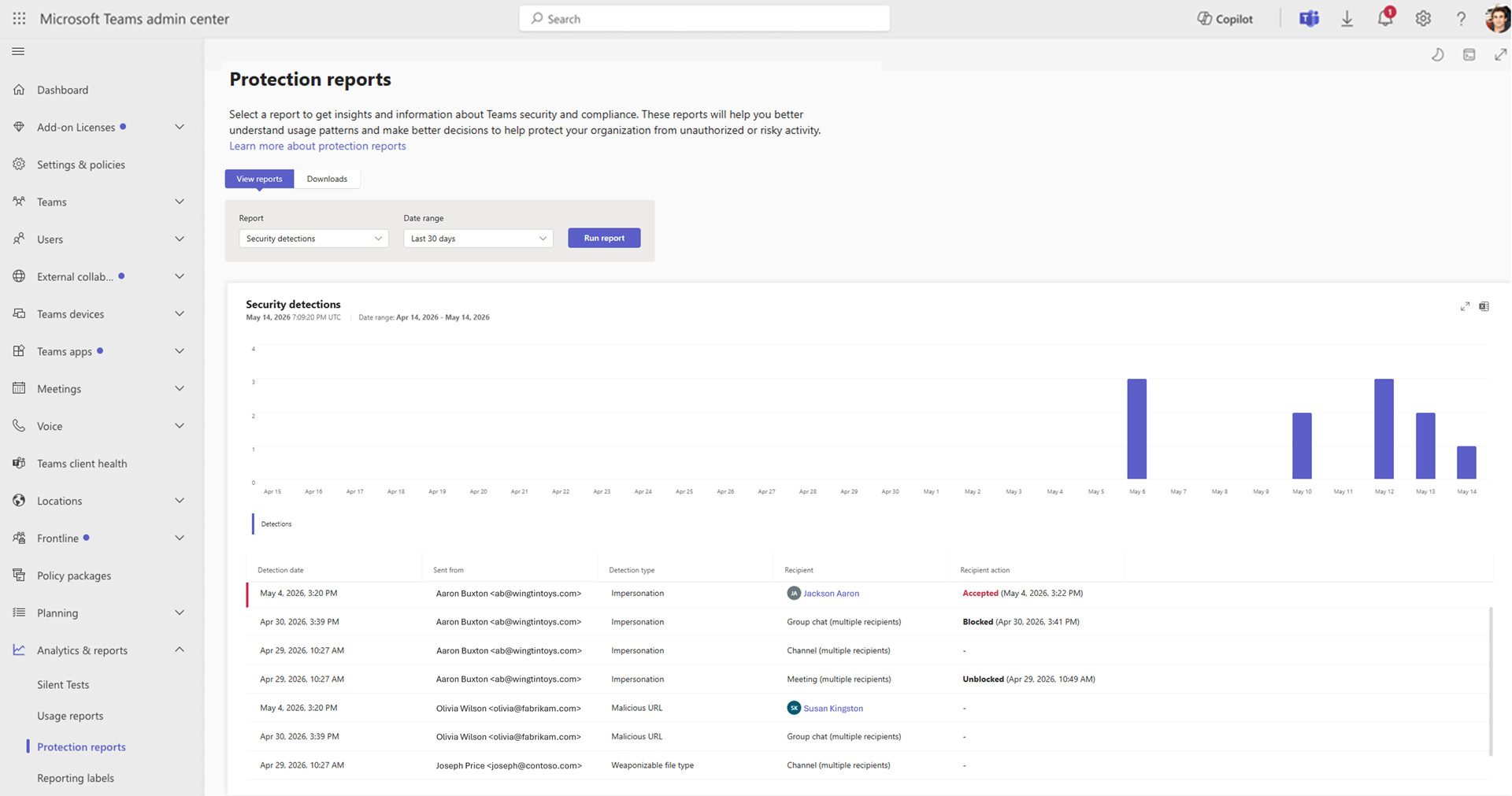
Each row in the detection table represents a single discrete threat event. Understanding what each field means is essential for accurate triage and incident response.
| Field | Description | Incident Response Use |
|---|---|---|
| Detection Date | UTC timestamp of when the threat was detected by Microsoft’s messaging protection layer | Establish attack timeline; correlate with endpoint and identity logs |
| Sent From | External sender’s display name and account identifier | Identify the threat actor’s account; check for domain compromise |
| Detection Type | Classifies the threat as Impersonation, Malicious URL, or Weaponizable File | Determines remediation path and escalation protocol |
| Recipient | The internal user, chat, channel, or Teams meeting that received the detected message | Identify affected users; assess scope of exposure |
| Recipient Action | Whether the recipient accepted, blocked, or unblocked the external communication | Critical for determining if threat was successfully delivered |
| Thread ID | Unique identifier for the Teams conversation thread | Enables forensic drill-down into the exact conversation via eDiscovery |
The Thread ID field deserves special emphasis for security teams. Combined with Microsoft Purview eDiscovery or Compliance Search permissions, the Thread ID allows analysts to retrieve the exact conversation — including message content, attachments, and timestamps — without manually searching across the organisation’s Teams instance. This is the single most important field for incident response documentation and forensic investigation.
Export Capabilities and SIEM Integration
The Microsoft Teams Security Detection Report supports native CSV export for both the chart summary and the complete detection table. This export capability enables several critical operational workflows:
SIEM Ingestion
Exported CSVs can be ingested into Microsoft Sentinel, Splunk, IBM QRadar, Chronicle SIEM, or any other SIEM platform for correlation with endpoint telemetry, identity events, and email threat data. Security teams working on Sentinel can create custom analytics rules that trigger on imported Teams detection data to generate automated incidents and playbook executions.
Compliance and Regulatory Documentation
For Indian enterprises operating under CERT-In’s 6-hour incident reporting mandate (effective May 2022) and the Digital Personal Data Protection Act (DPDPA) 2023, the exported detection record — with Thread IDs, sender identifiers, and detection timestamps — provides the forensic artefacts required for mandatory incident notifications. A Teams-based phishing attack that compromises employee credentials constitutes both a cybersecurity incident and a potential personal data breach under these frameworks.
Additional Export Metadata
The exported CSV includes two fields not visible in the admin UI:
- Sender Identifier: The full Microsoft account ID of the external sender (not just the display name), enabling accurate attribution even when attackers use deceptive display names
- Thread ID: The complete conversation thread identifier for cross-platform forensic correlation
Blocking Malicious External Users: Detection to Containment
The Security Detection Report provides a direct remediation pathway. Once a malicious external sender is identified in the detection table, administrators can immediately block that user or their entire sending domain through:
Teams Admin Center → External Access settings → Block specific user or domain
This workflow reduces the detection-to-containment cycle from hours (the typical time to escalate through helpdesk and into admin action) to minutes. Recommended containment actions based on detection type:
- Impersonation: Block the sender’s full account identifier; if using a known compromised domain, block at the domain level
- Malicious URL: Block the sender; additionally, submit the URL to Microsoft through Defender’s Report a URL feature to improve detection for the broader tenant community
- Weaponizable File: Block the sender; if the file was opened by the recipient, initiate an endpoint forensic investigation immediately — file-based delivery often means a payload was executed within the 12-minute window that Microsoft has measured as the median attacker dwell time before script execution
For coordinated threat actor campaigns — particularly those linked to APT infrastructure — combining Teams domain blocking with corresponding Exchange Online mail flow rules and network-layer firewall blocks on the threat actor’s IP ranges creates a multi-layer containment posture. We previously documented this kind of coordinated detection and response methodology in our coverage of social engineering campaigns targeting Indian enterprises.
KQL Threat Hunting for Microsoft Teams URL and Phishing Threats
For SOC analysts working in the Microsoft Defender portal with Advanced Hunting access (requires Microsoft Defender for Office 365 Plan 2 or Microsoft 365 E5), the following KQL queries provide granular Teams-specific threat hunting capability that complements the Security Detection Report’s dashboard.
Query 1 — Teams URL click threat alerts (core query):
AlertEvidence
| where ServiceSource == @"Microsoft Defender for Office 365"
| where EntityType == @"Url"
| where Title has "Teams"
| project Timestamp, AlertId, Title, EntityType, EvidenceRole, RemoteUrl
| sort by Timestamp desc
This query surfaces all Defender for Office 365 alert evidence records where the entity is a URL and the alert title references Teams — covering both “A user clicked through to a potentially malicious URL” and “A potentially malicious URL click was detected” alert types generated by Microsoft Defender’s Safe Links integration for Teams.
Query 2 — Teams phishing incidents with severity triage:
AlertInfo
| where ServiceSource == @"Microsoft Defender for Office 365"
| where AttackTechniques has "Phishing"
| where Severity in ("High", "Medium")
| join kind=inner AlertEvidence on AlertId
| where EntityType == @"User" or EntityType == @"Url"
| project Timestamp, AlertId, Title, Severity, Category, EntityType, EvidenceRole
| sort by Timestamp desc
Query 3 — Correlate Teams detections with identity events for lateral movement:
AlertEvidence
| where ServiceSource == @"Microsoft Defender for Office 365"
| where Title has "Teams"
| join kind=leftouter (
    IdentityLogonEvents
    | where ActionType == "LogonSuccess"
    | where Application == "Teams"
) on $left.AccountUpn == $right.AccountUpn
| project AlertTimestamp=Timestamp, AlertTitle=Title, UserAccount=AccountUpn, LogonTime, DeviceName, IPAddress
| sort by AlertTimestamp desc
These queries are designed to be run in Microsoft Defender Advanced Hunting and are directly compatible with Microsoft Sentinel’s KQL-based analytics rules. For advanced hunting methodologies applied to nation-state actor campaigns that leverage Teams as part of their intrusion chain, see our detailed KQL playbooks for Volt Typhoon LotL detection and Salt Typhoon GhostSpider campaign hunting.
Microsoft Teams Security in 2026: The Broader Architecture
The Security Detection Report is one of three major Teams security capabilities launching in August–September 2026. Understanding how they interlock is important for building a complete Teams security architecture.
“Report a Meeting” — Deepfake and Fraud Detection in Live Calls
Rolling out August 2026, Microsoft Teams now allows meeting participants to report suspicious in-meeting activity — including AI-generated deepfake personas, phishing attempts, impersonation, social engineering, and suspected scam activity — directly from within a Teams meeting or meeting chat window.
When a participant submits a report, Microsoft collects meeting metadata and limited contextual information and makes it available to the organisation’s security team through both the Microsoft Defender portal and the Teams Admin Center. Reports remain within the tenant — they are not automatically transmitted to Microsoft.
Reportable threat types include:
- AI deepfake meeting participants impersonating executives or partners
- Phishing attempts delivered through meeting chat or screen sharing
- Scam scenarios — particularly relevant given the rise of “digital arrest” scam calls in India, which we covered in our analysis of Supreme Court action on deepfake-enabled cybercrime
- Social engineering through urgency-based manipulation during meetings
According to Microsoft’s 2025 security research: “AI-powered fraud attacks are happening globally, with much of the activity coming from China and Europe.” The “Report a Meeting” feature is Microsoft’s direct response to this threat vector extending into video conferencing.
External Meeting Bot Detection and Control
Microsoft is concurrently deploying a feature that gives Teams meeting organisers real-time visibility into external bots joining their meetings, along with granular controls over what those bots are permitted to do — including the ability to restrict recording, transcription access, and content exfiltration.
This addresses a documented attack pattern where threat actors deploy AI-powered meeting bots to silently record sensitive business discussions, exfiltrate conversation content, or manipulate meeting transcripts for social engineering follow-up.
Microsoft Defender URL Click Alerts for Teams (GA: March 2026)
Already in general availability since March 2026, Microsoft Defender for Office 365 URL click alerts for Teams automatically detect and correlate dangerous link interactions in Teams conversations. This layer generates two specific Defender alerts:
- “A user clicked through to a potentially malicious URL”
- “A potentially malicious URL click was detected”
These alerts appear in the Microsoft Defender portal with full Teams message context and are automatically correlated with related threats across email, identity, and endpoint — creating a unified attack narrative. They require Microsoft Defender for Office 365 Plan 2 or Microsoft 365 E5 and are enabled automatically — no manual activation required. Note that Automated Investigation and Response (AIR) currently does not process these alerts automatically; manual analyst triage is required.
Microsoft 365 Licensing Requirements
Understanding exactly which capabilities are available at each Microsoft 365 licensing tier is critical for security investment planning.
| Capability | Minimum License Required |
|---|---|
| Security Detection Report (Impersonation detection only) | Microsoft 365 Business Basic, E3, or equivalent |
| Malicious URL scanning in Teams (Safe Links) | Microsoft Defender for Office 365 Plan 1 or Plan 2 |
| Weaponizable file scanning in Teams | Microsoft Defender for Office 365 Plan 1 or Plan 2 |
| Defender URL Click Alerts for Teams | Microsoft Defender for Office 365 Plan 2 or M365 E5 |
| Advanced Hunting (KQL queries in Defender) | Microsoft Defender for Office 365 Plan 2 or M365 E5 |
| Automated Investigation and Response (AIR) | Microsoft Defender for Office 365 Plan 2 or M365 E5 |
Organisations operating on Microsoft 365 E3 without Defender for Office 365 Plan 2 are operating the Security Detection Report in a significantly reduced state — impersonation detection is their only active signal. Evaluating an upgrade path to Microsoft 365 E5 or a Defender for Office 365 Plan 2 add-on is strongly recommended for any organisation that relies on Teams for sensitive business communication.
For context on the threat cost of underinvestment in security tooling, Microsoft’s July 2026 Patch Tuesday addressed 622 CVEs — the largest single-month patch volume in Microsoft’s history — underscoring the pace at which the Microsoft ecosystem’s attack surface is expanding.
Preparing Your Organisation: 5-Step Readiness Checklist
To maximise the value of the Microsoft Teams Security Detection Report from day one of availability, security and IT teams should complete the following preparatory steps:
-
Enable Messaging Safety settings for malicious link and unsafe file scanning
Without this configuration, two of the three detection pillars (malicious URLs and weaponizable files) will produce zero detections in the report. Navigate to Teams Admin Center → Messaging Policies → Messaging Safety and enable both URL and file scanning. -
Assign appropriate admin roles to security personnel
Ensure your SOC analysts and security administrators hold the Teams Administrator or Teams Communication Support Engineer role in Microsoft Entra ID. These roles provide access to Protection Reports without requiring Global Admin elevation. -
Establish a regular export and SIEM ingestion workflow
Set a recurring schedule — weekly or bi-weekly — to export the detection table CSV and ingest it into your SIEM. For Microsoft Sentinel users, consider building a Logic App that automatically exports and ingests the report on a schedule. -
Update incident response runbooks and playbooks
Add the Security Detection Report as a mandatory first-look step in all Teams-related social engineering, phishing, and credential theft playbooks. Document the Thread ID lookup process for forensic investigation using Microsoft Purview eDiscovery. -
Train your security operations team
Conduct a tabletop exercise using synthetic detection data to ensure analysts understand all report fields (particularly Thread ID and Recipient Action), the CSV export process, and the External Access blocking workflow.
Implications for India’s Enterprise Cybersecurity Posture
For Indian enterprises, the Microsoft Teams Security Detection Report has specific regulatory relevance. CERT-In’s 2022 directives mandate reporting of cybersecurity incidents within 6 hours of detection. A successful Teams-based phishing attack that compromises an employee’s Microsoft 365 credentials constitutes a cybersecurity incident under these guidelines — and if personal data is accessed, the DPDPA 2023 adds a parallel data breach notification obligation.
The export capabilities of the Security Detection Report — with Thread IDs, sender identifiers, detection timestamps, and recipient actions — directly support the documentary requirements for both CERT-In incident notifications and DPDPA breach reports. Indian organisations should integrate this report export into their incident documentation standard operating procedures (SOPs) immediately.
The broader context of enterprise threat exposure in India — including the Bank of Baroda 1TB data breach, the DRDO classified data exposure, and the Kudankulam Nuclear Plant breach — all demonstrate that collaboration and communication platforms are increasingly exploited as the initial access vector for large-scale breaches. Hardening Microsoft Teams is no longer optional for Indian enterprises handling sensitive data.
Conclusion: A Necessary Step Forward — With Known Gaps
The Microsoft Teams Security Detection Report is a genuinely important capability addition to the Microsoft 365 security stack. For years, Teams represented a significant blind spot — organisations had strong email threat detection through Defender for Office 365 but minimal native visibility into Teams-specific messaging threats. That gap is now meaningfully reduced with this single, centralized dashboard.
The report’s combination of three detection categories (impersonation, malicious URLs, weaponizable files), CSV export for SIEM ingestion, Thread ID-based forensic drill-down, and direct integration with External Access blocking creates a credible detection-and-response workflow that did not previously exist natively in the Teams admin experience.
However, security teams should be aware of the known gaps:
- The report does not generate real-time alerts — active monitoring or scheduled export is required
- Internal sender threats (compromised internal accounts used to spread malware) are out of scope
- The Microsoft Sentinel real-time streaming integration for Teams detection events does not yet exist natively — CSV-based ingestion is the current path
- AIR (Automated Investigation and Response) does not yet process Teams URL click alerts automatically
These gaps define the next evolution Microsoft must deliver. For now, every security-conscious Microsoft 365 tenant should enable this report immediately upon general availability — along with the Messaging Safety settings required to activate all three detection pillars.
Primary Sources & Further Reading:
- Microsoft 365 Roadmap — Feature ID 560702: Security Detection Report in Teams
- Microsoft Message Center MC1311977 — Official Announcement
- AdminDroid — Security Detection Report in Teams Admin Center
- HandsOnTek M365 Admin — Teams Security Detection Report Guide
- CyberSecurityNews — Microsoft to Launch New Security Detection Report in Teams
- Microsoft Security Blog — Email Threat Landscape Q2 2026
- Microsoft Teams Admin Center
- Microsoft Defender Portal
Related Research from Vivek Verma | Cybersecurity:
- Volt Typhoon: LotL Threat Hunting with KQL, Splunk, and Sigma Rules
- Salt Typhoon GhostSpider: Telecom Breach Threat Hunting Queries
- Microsoft July 2026 Patch Tuesday: 622 CVEs and Active Zero-Day Analysis
- Digital Arrest Scams in India 2026: Supreme Court Action and Deepfake Cybercrime Law
- CVE-2025-21298: Windows OLE Zero-Click RCE via Outlook — Analysis and Detection